


Operating Systems
Connectivity Software is a multi-faceted software, with some of its features tied to specific operating systems, and some inherently more generic. If you are developing for the "full" .NET Framework, on the COM Platform, or are using some specific member products such as Excel Connector, you will need Microsoft Windows. In many other cases, you can also use Linux or macOS.
QuickOPC, as an OPC client or subscriber, works on Microsoft Windows, Linux, or macOS. The OPC server you are connecting to, however, can run on any operating system or platform, as long as it exposes the right communication interfaces. This is especially common with OPC Unified Architecture servers; many of them run on Linux, or various embedded devices and systems.
Microsoft Windows
Practically all QuickOPC capabilities are supported on Microsoft Windows. You can develop .NET Framework and .NET 8+ applications, COM applications, or integrate OPC with Excel. Both client and server editions of Windows are supported. In addition, QuickOPC (except its UI features) also runs on Windows systems classified as "Server Core", i.e. systems with no graphical user interface for management.
Supported systems range from Windows 10 and Windows Server 2012 to Windows 11 and Windows Server 2022, including Windows Server Core editions. Both 32-bit and 64-bit editions of Windows operating systems are supported.
If you later decide to port your project to Linux or macOS, you will not have to write it anew: QuickOPC objects and methods are identical between the operating systems.
Linux
QuickOPC runs on various Linux distributions by means of the .NET 8+ runtime. On Linux, OPC Unified Architecture and OPC XML-DA are directly supported. The programming is identical to that on Windows or macOS for .NET 8+ - in fact, there is just one set of QuickOPC assemblies and/or NuGet packages targeting .NET 8+.
Features specific to Windows user interface, such as Live Binding, and browsing dialogs and controls, are not available under Linux.
macOS
QuickOPC runs on macOS, by means of the .NET 8+ runtime. On macOS, OPC Unified Architecture and OPC XML-DA are directly supported. The programming is identical to that on Windows or Linux for .NET 8+ - in fact, there is just one set of QuickOPC assemblies and/or NuGet packages targeting .NET 8+. You can use any macOS version that runs a version of .NET supported by QuickOPC.
Features specific to Windows user interface, such as Live Binding, and browsing dialogs and controls, are not available under macOS.
OPC Client Toolkit Made Right
QuickOPC can be characterized as an OPC toolkit. It has, however, some characteristics that make it different from other OPC SDKs on the market. Specifically, it does not expose the imprint of underlying OPC methods to its own API - it does not require you to deal with the low level stuff. And, it transforms the OPC communication into an API that appears to be connection-less; this allows your code be free of all setup, tear-down, and re-connection worries.
 Download fully functional free trial.
For OPC UA server toolkit, see OPC Wizard instead.
Communication beyond limits
QuickOPC is a radically new approach to access OPC data. It is an ideal tool to publish OPC data on the web or integrate OPC connectivity to custom applications involved in industrial automation or process control.
QuickOPC gives unbelievably short code to create OPC clients. In addition, using complex heuristic algorithms to optimize itself on the fly, QuickOPC toolbox provides the most efficient, fastest access to the OPC data.
OPC Labs has successfully tested QuickOPC at OPC Foundation Interoperability Workshops against a large set of OPC Servers from various vendors.
Read more about QuickOPC benefits...
Architecture
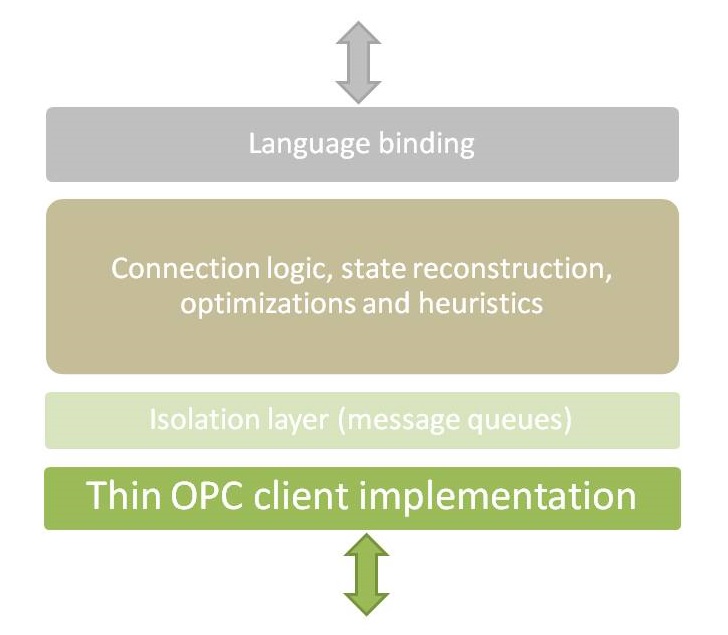
QuickOPC has a modular architecture with clear separation of responsibilities.
QuickOPC Parts
The QuickOPC product allows development of clients for OPC protocols in various tools under Windows. It consists of three basic parts:
- QuickOPC.NET, for OPC "Classic" specifications (COM- and XML-based), and Microsoft .NET Framework technology
- QuickOPC-COM, for OPC "Classic" specifications, and use with Microsoft COM (OLE automation)
- QuickOPC-UA, for OPC Unified Architecture specifications (for use from within .NET or COM-based tools)
- Support for OPC UA Alarms & Conditions.
- NuGet package distribution format.
QuickOPC Listing in Product Catalog on OPC Foundation Site
Why QuickOPC?
- It works in a wide range of programming languages and tools. C# and Visual Basic are the most obvious, but the list is very long.
- OPC Specifications: QuickOPC supports OPC Data Access 1.0, 2.0 and 3.0, OPC Alarms and Events 1.10 and earlier, OPC XML-DA 1.01, and OPC Unified Architecture (natively, or through UA COM Proxy - included).
- You can develop on Microsoft Windows in .NET, or with a use of COM-based tools. Read more about the platforms.
- You can pick from, or combine multiple development models. When developing user interfaces, you can replace or supplement the traditional imperative programming by a codeless Live Binding model. More advanced models such as Live Mapping, or Reactive Programming, are available as well.
- QuickOPC toolbox is suitable for a wide range of usage areas in process control and industrial automation. For example, developing HMIs, dynamic recipe loading, or customized data loggers, is straightforward.
Key Features
- Tested for compliance with OPC protocol standards, and for interoperability.
- Integration with Visual Studio development environment.
- Internal messaging layer provides isolation between OPC communications and the custom client code, resulting in high resiliency.
- Automatically connects to and disconnects from OPC Servers.
- No limits to number of connections, subscriptions, or tags.
- Supports all flavors of OPC synchronous and asynchronous reads and writes internally, subscriptions, discovery, browsing, and property access.
- Wide range of developer productivity features: Intellisense, ReSharper annotations, serialization support, and many more.
- Browsing Dialogs: Ready-made set of rich user interface (UI) components for browsing the OPC world.
OPC Foundation Certification
 OPC Foundation Certified for Compliance logo indicates that this product has been tested by an independent certification lab and certified to be compliant with the following OPC UA Profiles which are part of the OPC UA Specifications:
- Core Client Facet
- Base Client Behavior Facet Discovery Client Facet
- Attribute Read Client Facet
- Attribute Write Client Facet
- DataChange Subscriber Client Facet
- DataAccess Client Facet

Additional information about compliance testing, logo program and a summary of test results can be found at www.opcfoundation.org for: QuickOPC.
OPC Foundation Certified for Compliance logo is a trademark of the OPC Foundation and may be used only by written permission of the OPC Foundation. Any unauthorized use of the Certified for Compliance logo is prohibited.OPC Foundation Compliance Test
 OPC Foundation Self-Tested for Compliance logo indicates that this product has been tested by the manufacturer to be compliant with the following OPC Specifications:
- Data Access 2.00
- Data Access 2.05a
- Data Access 3.00
Additional information about compliance testing, logo program and a summary of test results for QuickOPC Client can be found at www.opcfoundation.org.
OPC Foundation Self-Tested for Compliance logo is a trademark of the OPC Foundation and may be used only by written permission of the OPC Foundation. Any unauthorized use of the Self-Tested for Compliance logo is prohibited.
Testimonial
I came across QuickOPC.net when undertaking a c# project that needed to access data in a Siemens PLC using OPC. Having used the free trial version, it quickly became clear that QuickOPC.net would remove the need for an in-depth knowledge of OPC client to server protocols and would allow me to concentrate on the application itself. It is very robust, easy to integrate into a .net project and the response to my questions by email was excellent. I'd certain only recommend the product and the company.
Peter Thomas, Control Specialists Ltd
Distribution Formats
Depending on your needs, you can obtain QuickOPC, OPC Wizard and/or Rapid Toolkit for Sparkplug either in form of a standalone installer, or in NuGet packages. QuickOPC is also available in Python packages.
Standalone Installer
This is what you get when you directly download the software from the Web site, or obtain it on a distribution media such as flash disk. The installation can then be started by running the setup program and following the on-screen instructions. The setup program presents a wizard-like series of steps, and offers "express" installation choices that allow the installation with just a few clicks, as well as "custom" installations with variety of individually selectable components.
The installation program requires that you have administrative privileges to the system. The installation package file is code-signed, increasing security, improving trust, and providing better download experience from the Web.
The Setup program has command-line switches that allow it to be run silently, and included in your own automated installation programs.
The product includes an uninstall utility and registers itself as an installed application in Windows. It can therefore be removed easily from Control Panel. Alternatively, you can also use the Uninstall icon located in the product’s group in the Start menu.
Useful links: Documentation / Knowledge Base
NuGet packages
NuGet (www.nuget.org) is a free and open-source package manager designed for the Microsoft development platform. The goal of NuGet is to make the process of incorporating third party libraries into your solutions as simple as possible. In addition to a standalone installer, QuickOPC, OPC Wizard and Rapid Toolkit for Sparkplug are provided in form of NuGet packages. Using NuGet allows you to simplify the management of libraries and their dependencies, with better control over library versioning and updates. You need to use a NuGet client (such as the one that comes with Visual Studio) in order to access the NuGet packages.
The NuGet client tools provide the ability to produce and consume packages. Our NuGet packages are hosted in the NuGet Gallery (https://www.nuget.org/packages). The NuGet Gallery is the central package repository used by all package authors and consumers.
When you use NuGet to install a package, it copies the library files to your solution and automatically updates your project (add references, change config files, etc.). If you remove a package from your project, NuGet reverses whatever changes it made so that no clutter is left.
Note that NuGet is primarily a tool for resolving build-time dependencies. The amount of functionality that you get through NuGet packages is smaller than what Connectivity Software can actually do for you. If you want a full coverage of the features, including all associated tools, you would be better off downloading the Setup program. Further below you will find a list of differences between the two distribution forms.
List of available NuGet packages
- OpcLabs.QuickOpc: OPC client and subscriber components for all environments and project types.
- OpcLabs.QuickOpc.Forms: Components that are specific for Windows Forms (can be partially used from WPF as well).
- OpcLabs.QuickOpc.Mqtt, OpcLabs.QuickOpc.MqttNet: MQTT communication packages (for OPC UA PubSub).
- OpcLabs.QuickOpc.Pcap: Ethernet communication package (for OPC UA PubSub).
- OpcLabs.OpcWizard. For rapid OPC UA server development.
- OpcLabs.EasySparkplug: Rapid Toolkit for Sparkplug - for host application and edge node development.
Example-only packages: For C# OpcLabs.OpcStudio.Sample.CS, for VB.NET OpcLabs.OpcStudio.Sample.VB.
What is included in the NuGet packages
- QuickOPC: Runtime assemblies for all OPC specifications and programming models.
- QuickOPC: OPC browsing dialogs and browsing controls for Windows Forms.
- OPC Wizard and Rapid Toolkit for Sparkplug: Runtime assemblies.
- IntelliSense support (XML comments).
Python packages
The Python Package Index (PyPI) is a repository of software for the Python programming language. QuickOPC Python packages are hosted on pypi.org.
Note that Python packages are primarily a tool for resolving dependencies. The amount of functionality that you get through QuickOPC Python packages is smaller than what QuickOPC can actually do for you. If you want a full coverage of the features, you should also install the full product using the the Setup program. Further below you will find a list of differences between the two distribution forms.
List of available Python packages
- opclabs-quickopc: OPC client components for all environments and project types (including Windows UI).
- opclabs-mqtt, opclabs-mqttnet: MQTT communication packages (for OPC UA PubSub).
- opclabs-pcap: Ethernet and capture file communication package (for OPC UA PubSub).
What is included in the Python packages
- Runtime assemblies for all OPC specifications.
- OPC browsing dialogs and browsing controls for Windows Forms.
What is only available from the Setup program
- Support for COM development (VB6, PHP, Excel, Delphi and similar tools).
- Conceptual documentation and Help.
- Visual Studio integration, including Live Binding design-time support (codeless creation of OPC applications).
- Examples and Demo applications, Bonus.
- OPC Data Access simulation server.
- Various tools, such as Connectivity Explorer, and OpcCmd and SparkplugCmd utilities.
- License Manager utility.
Useful links: Documentation / Knowledge Base
Sparkplug is a trademark of Eclipse Foundation, Inc. "MQTT" is a trademark of the OASIS Open standards consortium. Other related terms are trademarks of their respective owners. Any use of these terms on this site is for descriptive purposes only and does not imply any sponsorship, endorsement or affiliation.