


Usage Areas
QuickOPC is not an OPC SDK that is limited to a particular segment, or kind of usage. There are, however, some common usages, and among them:
Human-Machine Interfaces (HMI) with QuickOPC
Many automation tasks involve some user interaction, such as presenting operator displays with continuously updating values, and allowing the operator influence the process. Software packages that provide this kind of functionality are commonly called HMI-s.
Dedicated OPC HMI packages exist from various vendors, but for many purposes, they are too complicated and costly. And, if you have more specialized needs, it may be difficult to customize their functions to your liking. That's where OPC client components like QuickOPC can help. Using C#, or programming language of your choice, you can create HMI screens together with application logic, and other OPC data processing as needed.
Subscribing to a value in an OPC UA (Unified Architecture) server and linking it to a control on the screen, or writing a data value can be achieved in just several lines of code, and sometimes with no code at all. OPC "Classic" Data Access and OPC Alarms&Events specifications are also supported. QuickOPC component interfaces hide the complexities of OPC client development and allow you to focus on your main task.
HMI Example
If you want see it for yourself, we have an example that shows how to create a simple screen with several updating item values, and an ability to change a setpoint. The screen looks like this:
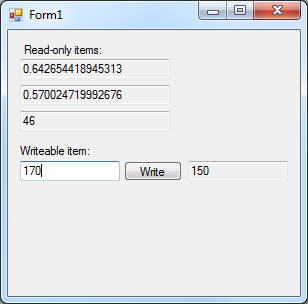
The example connects to our Simulation OPC Server, but you can quickly modify it to connect to your OPC server instead. Simply download the product and then open the project, or follow the tutorial below (in C#).
How to create a simple HMI screen
HMI with Live Binding
The Live Binding feature of QuickOPC gives you the possibility to create HMI screens without any manual coding. Just drag the controls to the form's surface (in Visual Studio), and use the wizard to bind their properties to OPC data.
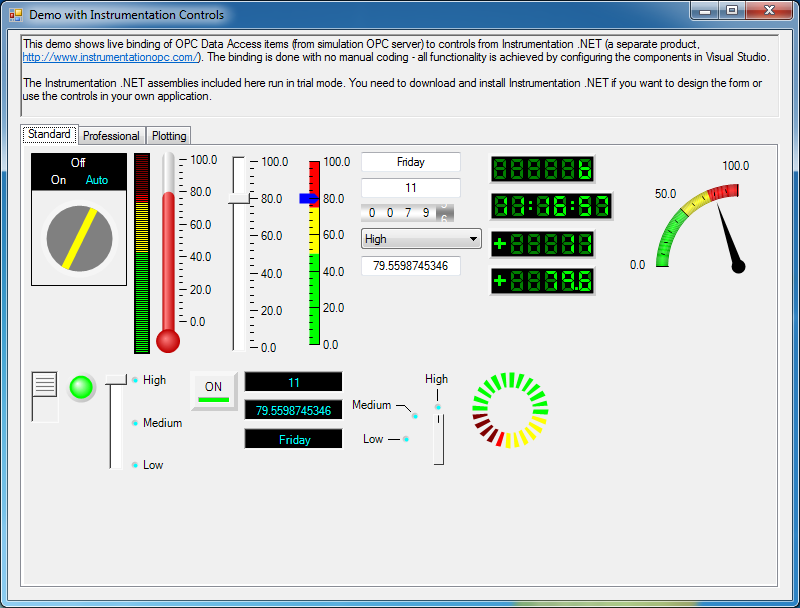
The live binding model is not limited to or associated with any particular set of UI controls. More information on Live Binding.
Logging OPC Data and Events
 It is a common requirement in automation to log the data from OPC servers into various file formats or databases. QuickOPC will make it easy for you to add OPC logging functionality into your OPC client application. Resilient subscriptions to data changes in OPC UA (Unified Architecture) server, or to event notifications coming from OPC UA Alarms & Conditions server can be achieved in just several lines of code. OPC "Classic" specifications - OPC Data Access and OPC Alarms&Events - are also supported. You can also trigger the logging by other conditions in the systems. QuickOPC components hide the complexities of OPC client creation and allow you to focus on your main task.
Dedicated solutions that provide OPC logging exist from various vendors. Such packages do a good job for standard usage, but if your needs are quite simple, then the off-the-shelf logging product may come too costly. On the other hand, if your application is more specialized, the dedicate logging product may not be able to provide the necessary level of customization. These are situations where OPC client components such as QuickOPC can help. Using programming language of your choice, you can integrate OPC logging into your application, and possibly also add custom application logic to it.
Logging Scenarios
How can OPC logging be integrated into your application? There are multiple ways of doing it, such as:
- Logging to XML file,
- Logging to SQL database, and
- Others.
One of advantages of using QuickOPC for logging is that the code you write does not have to contain any special logic for handling reconnections. Such logic is handled by QuickOPC, and in case of problems, your code gets a notification about the error. After a configurable period, a connection attempt is automatically made, and the data may start flow again. The savings in amount of code you need to write are tremendous.
Logging to SQL Database
There are various ways how to connect to the SQL server, such as ADO.NET, OLEDB, or ODBC, and you have full flexibility in using them.
Our example logs OPC data item changes into a table in Microsoft SQL server using ADO.NET connection. Each logging entry contains information about which item has changed, its value, timestamp, and quality, associated error message (if any), and more. Same technique can be used to log notifications coming from OPC Alarms&Events servers.
How to log OPC Data Access item changes into an SQL database
Other approaches exist as well; it is, for example, possible to put the logging code into the SQL Server itself. For details, see OPC with Microsoft SQL Server.
Logging to XML File
In this case, you can take advantage of the fact that .NET objects of QuickOPC are natively serializable into XML. When you subscribe to data or alarms, the event arguments object passed to the event handler already contains all information worth logging. You can therefore write the whole object into the log, or just parts of it, possibly together with additional information required by your specific application.
In the first example, we will log OPC Data Access item changes into an XML file. Each logging entry contains information about which item has changed, its value, timestamp, and quality, associated error message (if any), and more.
How to log OPC Data Acess item changes into an XML file
Our second example will be similar, except that it will log notifications coming from OPC Alarms and Events server. Each notification is logged with information such as the qualified source name, time of the event, event type, event category, event severity, condition name, message, etc.
How to log OPC Alarms and Events notifications into an XML file
Logging to Other Formats and Targets
Using the same or similar techniques as described above, you can log the OPC data into other formats and targets as well - for example, Microsoft Access, mySQL, Oracle, and various file formats such as CSV or JSON.