


Online Forums
Technical support is provided through Support Forums below. Anybody can view them; you need to Register/Login to our site (see links in upper right corner) in order to Post questions or issues. You do not have to own a commercial license in order to use the OPC Labs support. Our team is actively monitoring the forums, and provides replies as soon as possible.
Please read Rules for forum posts before reporting your issue or asking a question. OPC Labs team is actively monitoring the forums, and replies as soon as possible.
Various technical information can also be found in our Knowledge Base. For your convenience, we have also assembled a Frequently Asked Questions page.
Do not use the Contact page for technical issues.
Using a client-certificate without having a trust store


Have you placed the (public part of the) CA root certificate to C:\something\issuer\ (I am taking this path from how you set in the program snippet you provided), plus those of any intermediate issuers (sub-CAs), if there are any?
More precisely, it should be a .DER file (or multiple files) placed in C:\something\issuer\certs ("certs" is added automatically).
Best regards
Please Log in or Create an account to join the conversation.


i think we can solve the issue with the Subject Alt name.
However we still have the issue that the Application (EasyUaClient) does not trust or certificate.
So our current issue is:
* We do have a Root-CA-Certificate that is not contained in the trusted store of the operating system.
* Nevertheless we need to get the Application (EasyUaClient) to trust this Root-CA-Certification.
Can you provide an example on how to use self created Root-CA from a file?
Please Log in or Create an account to join the conversation.
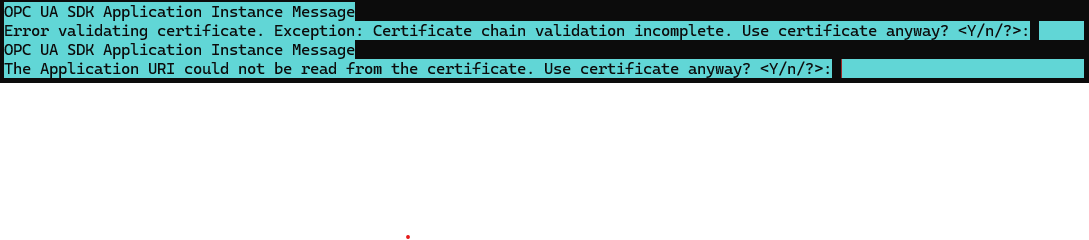
The "certificate chain validation incomplete" is more demanding to diagnose, so I would like to leave it for the second step.
The "The Application URI could not be read from the certificate" is critical. Certificates to be used as OPC UA application instance certificates must fulfil certain conditions, described in the OPC UA specifications. One of them is that the Application URI must be present and correct. In the certificate, it is represented as SubjectAltNameExtension. The error message indicates that there is no such extension in the certificate.
The ApplicationURI in the certificate is such a pivotal concept in OPC UA security, that nothing can really work correctly without it. Even accepting the message prompt would not bring you much further, because such certificate in invalid in OPC world and the OPC UA server will not accept it. So first thing to do is to generate the certificate that has the ApplicationURI (and it also fulfils other OPC UA requirements - see e.g. reference.opcfoundation.org/specs/OPC-10000-6/6.2.2 )
Best regards
Please Log in or Create an account to join the conversation.
i'm still having some troubles here.
setting OrganizationName = "#" seems to work. But still i cannot get quickOpc to trust my certificate.
Here is snipped of the code i'm using:
Accepting any certificate given by the server. I think this should be irrelevant for my current issue.
Setting the InstanceIssuerStorePath. Where in the given directory the public part of the root ca is placed withing a subfolder "certs" in the .der format
Loading the client certificate
Still i get the prompt as attached.
Please Log in or Create an account to join the conversation.
I am unsure about the title of the topic ("... without having a trust score"). Even in the scenario you described, the trust stores are still there. It is just that QuickOPC does not generate the self-signed certificate by itself.
You correctly understand that for using such externally provided certificate, QuickOPC needs to know its subject name - this is how it finds it in the certificate store. If there is no "O=" element, but otherwise the subject name conforms to what QuickOPC generates, you can set the EasyUAApplication.Instance.ApplicationParameters.ApplicationManifest.OrganizationName property to "#". This will cause the "O=" element be omitted from the subject name. If there are larger differences that cannot be rectified just by leaving out the parts, you can safely use the "obsoleted" EasyUAApplication.Instance.ApplicationParameters.ApplicationManifest.InstanceCertificateSubject property. It is not really "obsoleted" for this kind of usage; by marking it as such, we wanted to communicate that developers should not use it in the more common cases.
You then need to place your certificate into the "trusted" store, and (the public part of) of the CA certificate into the "issuers" store. With it, does the confirmation prompt still appear?
Best regards
Please Log in or Create an account to join the conversation.
* The certificate I must use has no O. Therefore, I need to use the deprecated method: EasyUAApplication.Instance.ApplicationParameters.ApplicationManifest.InstanceCertificateSubject. Is there a way to do this that is not deprecated?
* The certificate is issued by a root CA over which I have no control. I therefore have to trust it. Is there a way to configure the loading of the certificate so that the prompt “OPC UA SDK Application Instance Message
Error during certificate verification. Exception: Certificate chain incomplete. Use certificate anyway? <Y/N/?>:” does not appear?
Please Log in or Create an account to join the conversation.